Copyright of WAVELET.BIZ
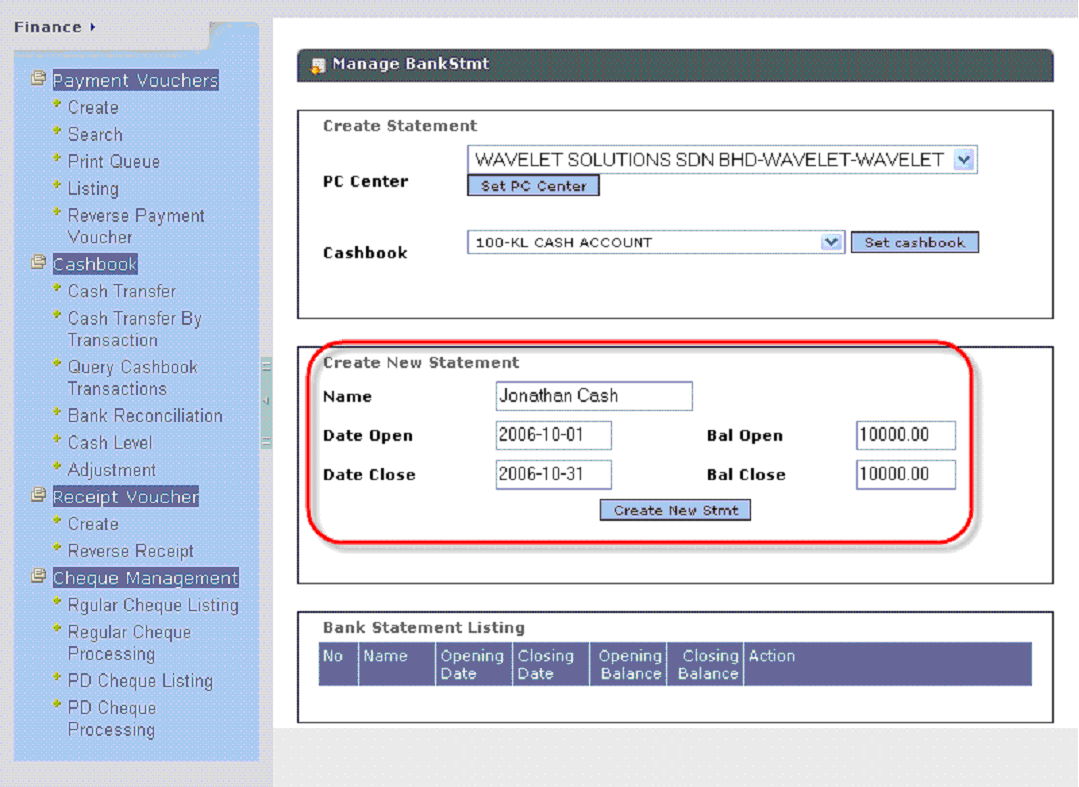
To create a bank reconciliation, the first step is to create bank statements in Wavelet software the correspond with your actual bank statements. To create these bank statements, click FINANCE -> BANK RECONCILIATION. The idea of creating bank statements are straight forward, basically we enter the opening balances and closing balances of each bank statements into Wavelet system as below:
Once you have created the bank statements, then you can start adding transactions recorded in Wavelet that match the transactions inside your actual bank statement. If you file these transactions wrongly into the Wavelet bank statement, just edit the bank statement and remove them. Once all the transactions between Wavelet and actual bank statements have been reconciled, 2 different "Bank Reconciliation Reports" could be printed.
 wavelet.biz